Every service, every person, every site. One system.
Scheduling, rosters, HR & payroll, employee benefits, quality, ticketing, warehouse, IoT sensors and maps: one platform instead of a dozen disconnected tools. The back-office, the operator app and the client portal all work on the same data.
Open demo, no sign-up required: three ready-made profiles.
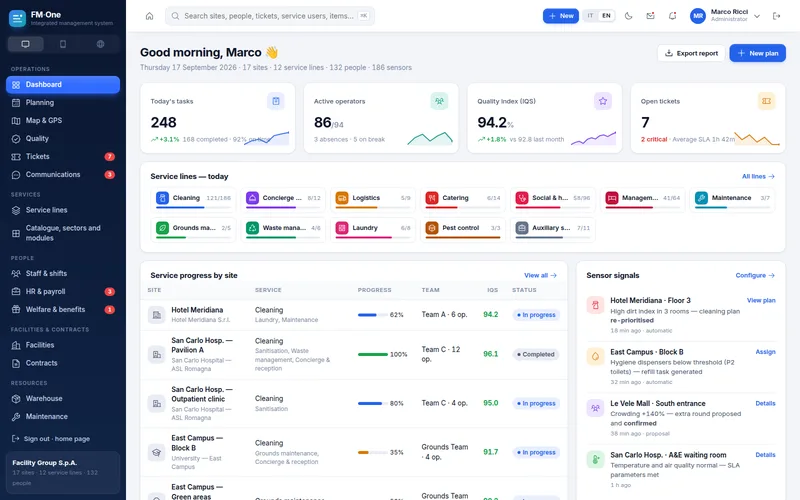
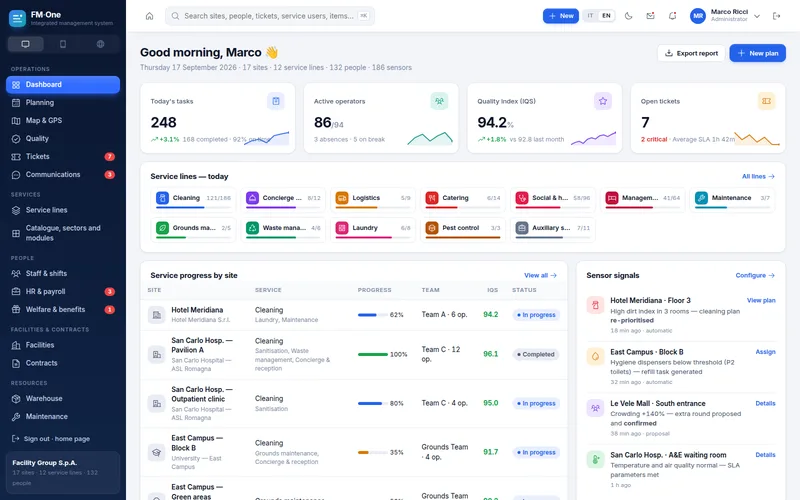
gestionale.nixsa.app/?lang=en#/bo/dashboard
Round re-ordered by sensors
Clock-in with distance check
Tickets with SLAs and escalation
3connected apps
12service lines
8market sectors
16modules, M0 to M15
Three apps, one set of data
The people who plan, deliver and receive the service all see the same picture
What field staff do on site instantly updates the plan in the office and the client portal. No timesheets to re-key, no conflicting versions of the same day.
Back-office
For management, supervisors, HR and administration: plan the work, monitor quality, and manage tickets, people, warehouse stock and contracts.
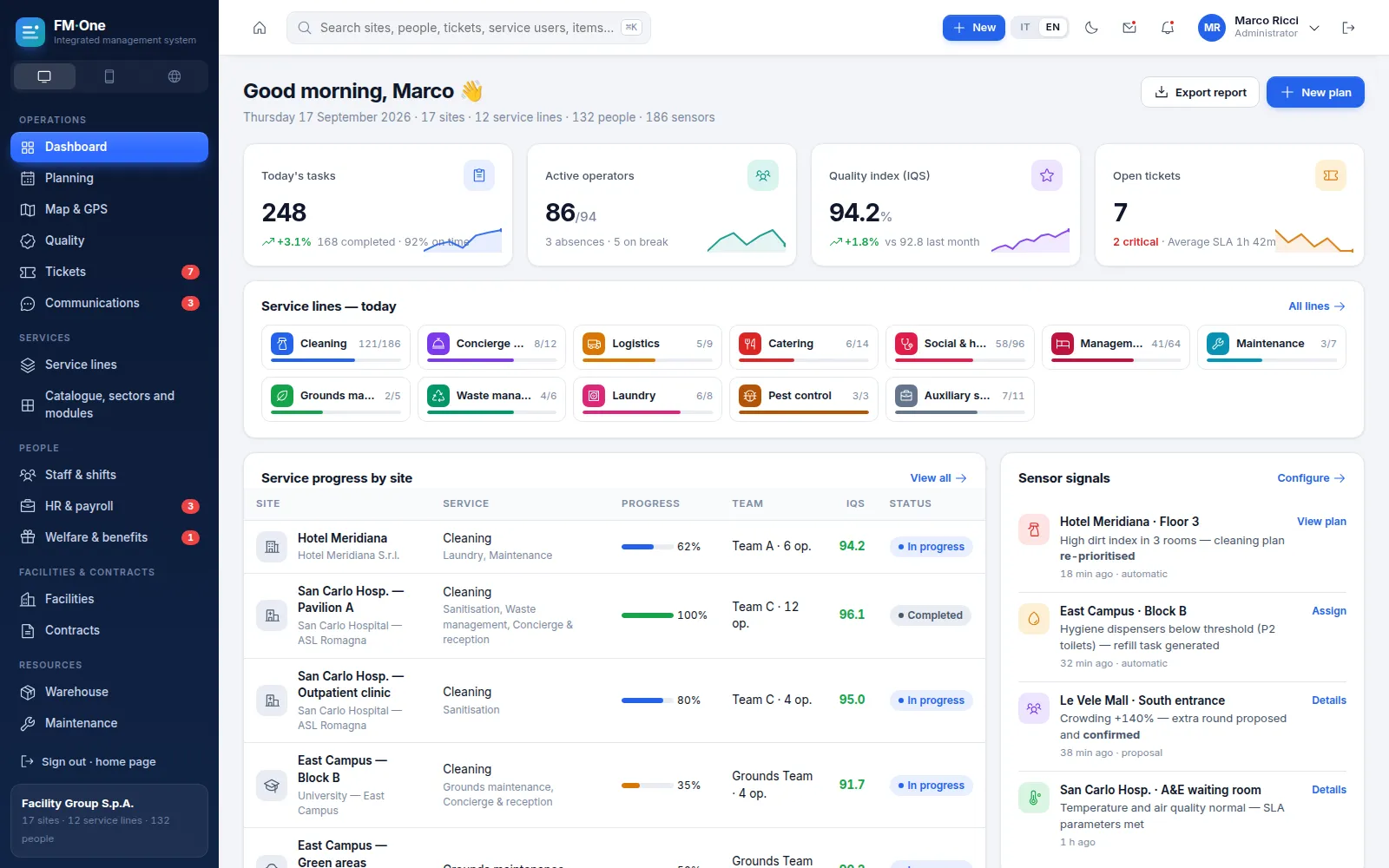
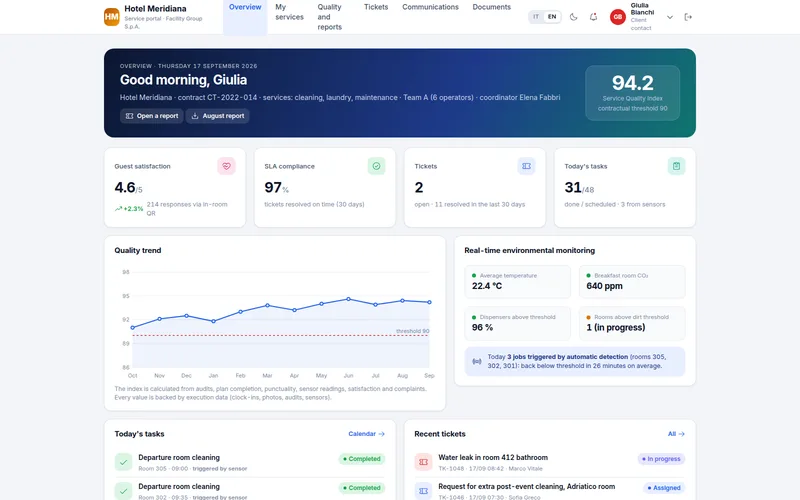
Dashboard with tasks, staff on shift, Service Quality Index (IQS) and tickets
Global search across sites, people, tickets and items
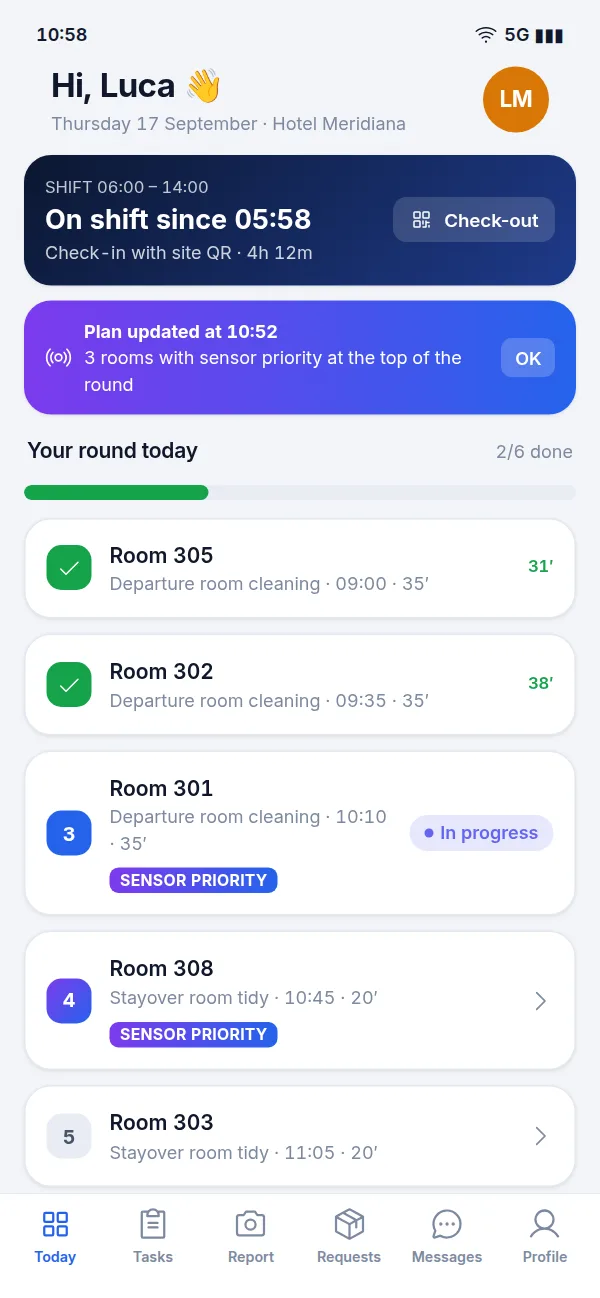
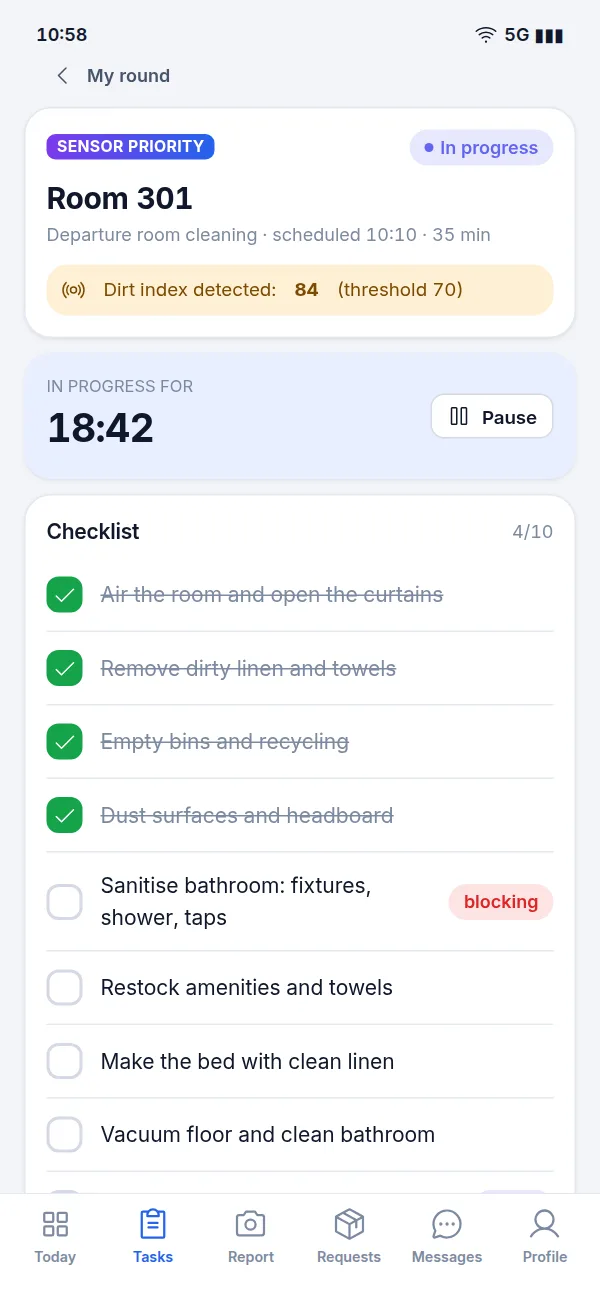
For the people on the ground: cleaners, concierges, care assistants (OSS), technicians, cooks, gardeners. It runs in the phone's browser and can be added to the home screen.
Daily plan, QR code start, checklists and photos
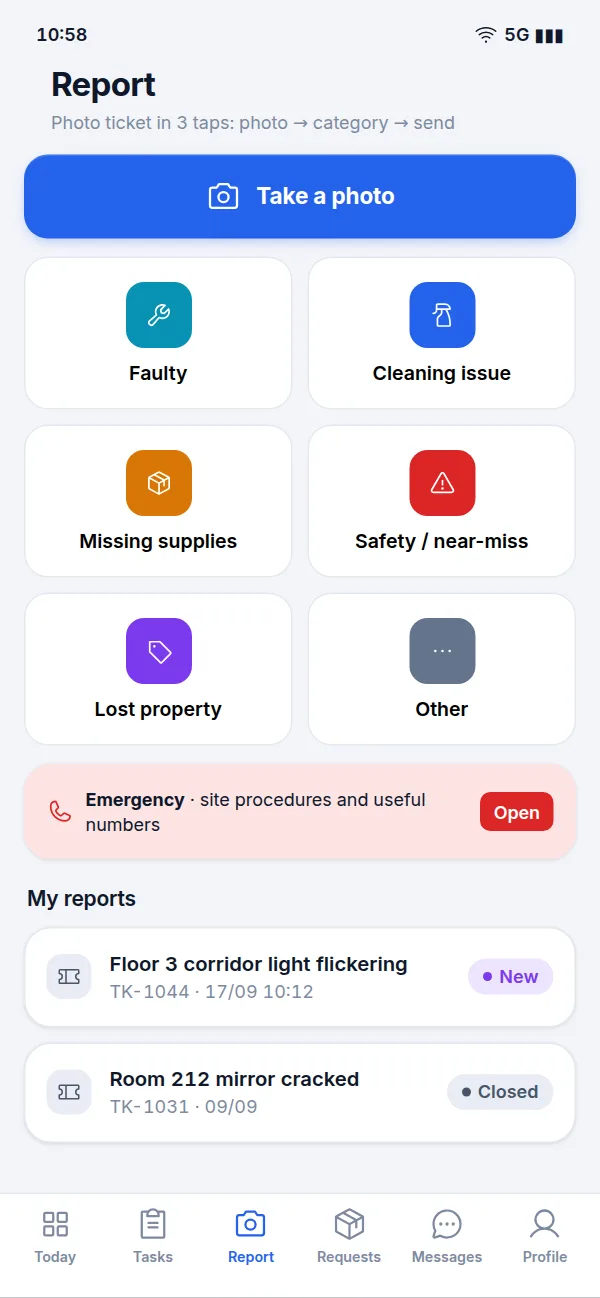
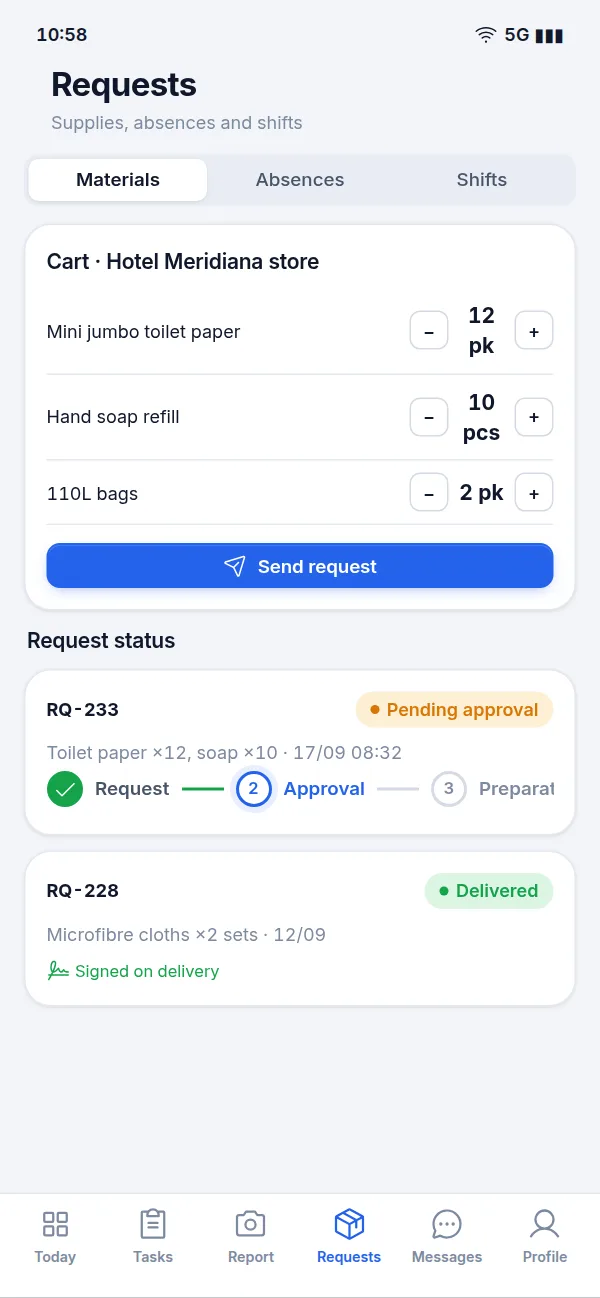
Issue reports, supply requests, leave and shift swaps
Messages, monthly hours, training deadlines, benefits
Every service gets its own tools, all on the same foundation
The visitor log at reception, HACCP self-checks in catering, care plans in social care, waste transfer notes: each line has exactly what it needs, while sharing staff, rosters, sites, warehouse stock, quality, tickets and reporting.
Cleaning and sanitisation
Work rounds, protocols by area, productivity rates and product usage.
Concierge & reception
Post coverage, visitors, key control, patrols with QR/NFC checkpoints.
Logistics and porterage
Time slots, move and handling requests, signed delivery notes.
Catering
Meals per site, menus, special diets, HACCP self-checks and batch tracking.
Social & home care
Care recipients, care plans, home visits with routes, a shared care diary.
Care home management
Units and residents, care minutes, shift handovers, incidents.
Technical maintenance
Asset register, planned preventive maintenance, work orders, statutory inspections.
Grounds maintenance
Horticultural calendar, weather, green asset inventory, plant protection log.
Waste and environmental services
Collections, waste streams and weights, waste transfer notes and carriers.
Laundry and linen
Soiled and clean linen dockets with reconciliation, linen room stock.
Pest control
QR-coded bait stations, activity trends, treatments and reports.
Auxiliary services
Requests by cost centre, room set-ups, errands.
gestionale.nixsa.app/?lang=en#/bo/linee
The modules at work
From planning to reporting, without switching software
The screenshots below are taken from the demo and use sample data. Click any image to enlarge it.
Scheduling and rosters
Plan once, and the plan keeps itself up to date
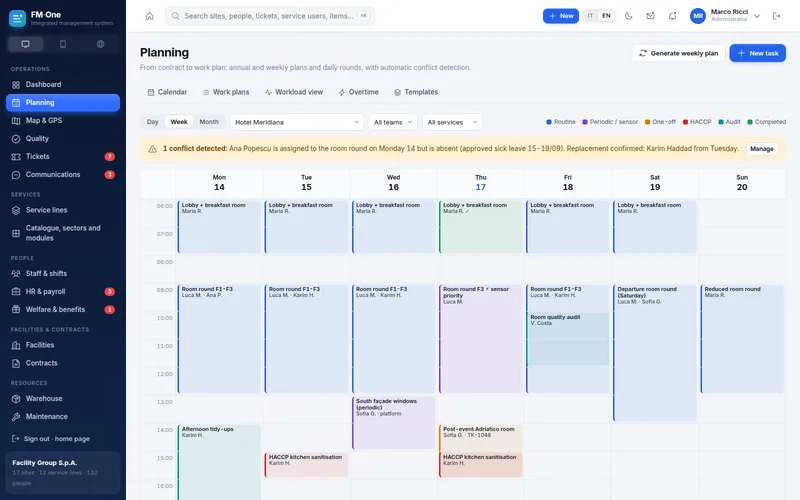
From contract to daily round: work plans for each site, calendars by team and service, recurring and one-off tasks. Conflicts are flagged as you plan.
Day, week and month views, filtered by site, team and service
Absences logged from the app or the back-office, with uncovered tasks and suggested cover
Roster matrix checked against the collective labour agreement: rest periods, weekly hour limits, consecutive nights
One confirmation updates the plan, rosters, notifications, timesheets and payslips
#/bo/pianificazione
Operator app
Field work, guided step by step
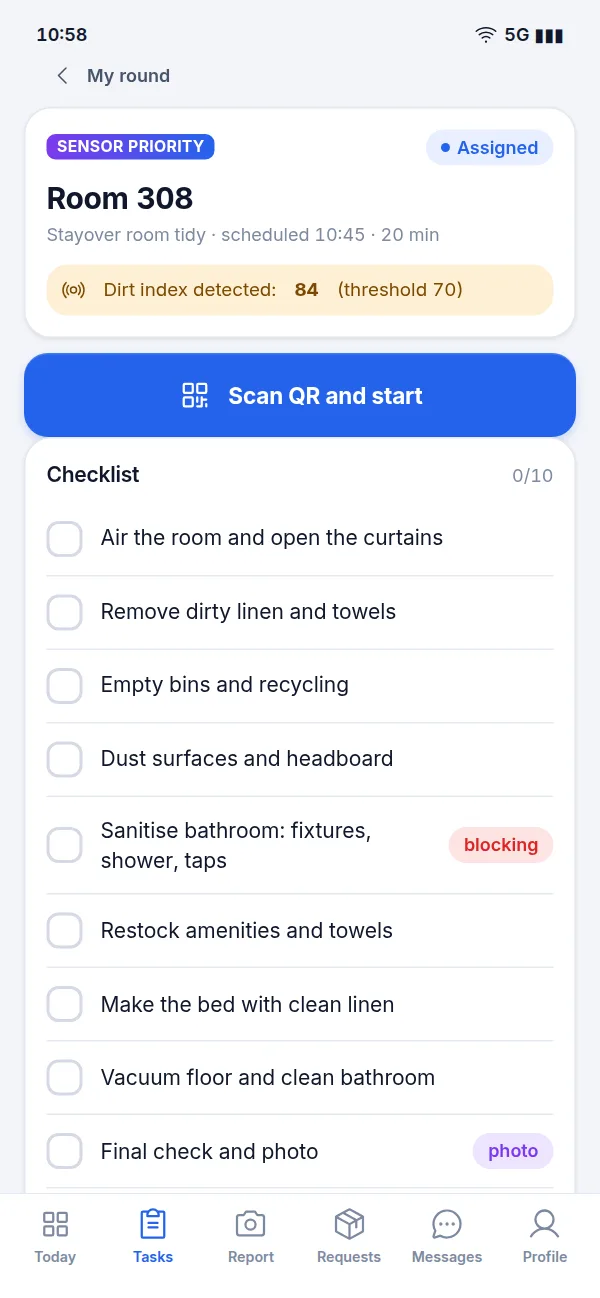
Every worker opens their phone and finds their round, in order of priority. They start a task by scanning the room's QR code, tick off the checklist and take photos. If something is wrong, they report it in three taps.
Check-in and check-out with the site's QR code
Checklists with mandatory items and photo evidence
Supply requests with status tracking and sign-off on delivery
Shifts, leave, messages, monthly hours, benefits and documents
On request, the app can be configured to work offline and sync as soon as the signal returns.
Quality and audits
Measured quality your clients can verify
Inspections with scoring grids and sampling, non-conformities with a clear cycle right through to effectiveness review, satisfaction collected by QR code. It all feeds into the IQS, the Service Quality Index.
Scored inspections, signed and countersigned by the client, with a formal report
Satisfaction (CSAT) from QR surveys in rooms and common areas
IQS calculated from audits, plan completion, punctuality, sensors, satisfaction and complaints
#/bo/qualita/nc
Tickets and SLAs
Every request has an owner and a deadline
One tracked channel for every request: portal, app, email, room QR codes, sensors. Assignment rules decide who handles it, SLAs keep the clock running and escalation steps in when needed.
Queue, kanban board and statistics, filtered by site, priority and channel
Response and resolution SLAs by request type and priority
Automatic escalation of overdue tickets
Clients open, follow and rate tickets from the portal
#/bo/ticket
HR, payroll & benefits
One record per person, from recruitment to exit
Your people don't live in a separate program: the staff you schedule are the same staff you recruit, hire, train and pay. Clock-ins become monthly pay items, and anomalies are resolved before anything goes to your payroll provider.
Headcount, recruitment, hiring and step-by-step onboarding
Expiring contracts, appraisals, disciplinary procedures and leavers
Attendance and payroll: items from timesheets, anomalies, export file for the payroll provider
Benefits: plan and allowance per employee, requests to approve, meal vouchers, discounts, rewards, staff engagement surveys
#/bo/hr/paghe
Maps and GPS
Sites, teams and vehicles on the map
One map showing where your sites are, who is out in the field, and the routes of mobile teams and home care assistants. Clock-ins check the distance from the site, within a radius you set.
Sites, field staff, daily routes and vehicles
Geolocated clock-ins with geofencing and out-of-range alerts
Clock-ins feed straight into timesheets, payroll and meal vouchers
GPS is read only at specific events (check-in, check-out, task start): people are never tracked continuously.
#/bo/mappa/percorsi
IoT sensors
Clean where it's needed, when it's needed
Soiling index, dispenser levels, footfall, room occupancy, temperature, CO₂: rules turn readings into action. The worker's round is re-ordered, a new task is created, or the supervisor receives a suggestion.
IF / THEN rules, fully automatic or subject to confirmation
Thresholds, dwell times, hysteresis and limits against repeated alarms
A log of every event and the action it triggered
Sensor-generated tasks are tagged in the app, the plan and the reports
In the demo the sensors are simulated: during onboarding we connect FM·One to your own devices and platforms.
#/bo/iot/regole
Warehouse, maintenance and assets
Supplies, equipment and deadlines under control
Products and consumables where they are needed, usage charged to each contract, equipment registered with its full history. The compliance calendar gives you advance warning of contract renewals, statutory inspections, staff fitness-for-work checks and vehicle servicing.
Items with green procurement compliance (CAM), technical and safety data sheets, stock levels and reorder suggestions
Requests from the field, stock movements, usage per contract, equipment and vehicles
Asset register, maintenance plans, work orders, MTTR
Regulatory and contractual deadline calendar with alerts
#/bo/magazzino
And there's more
Reporting and analytics
Dashboards, hours and margins per contract, a KPI library, scheduled reports and exports.
Care records
Care plans, diary, vital signs, shift handovers and incidents for care recipients and residents.
HACCP
Logs and temperatures, corrective actions on out-of-range readings, batches, diets and menus.
Contracts and suppliers
Operational scope, services and price lists, suppliers and subcontractors.
Communications
Team chat, notice board, a notification centre with preferences and quiet hours.
Global search
Sites, clients, people, care recipients, tickets, items and assets from a single search box.
Light and dark themes
Comfortable in the office, comfortable at night
Every user switches theme with a single click. Drag the slider to compare the same dashboard in both themes.
The 16 modules
The core is shared by every service line; specialist modules are switched on only where you need them.
M0CoreIdentity, roles and data scopes, audit trail, configuration
M15HACCP and food safetyLogs, temperatures, batches, diets, menus
Who it's for
For those who deliver services, and those who receive them
Multi-service contractors and cooperatives
Organisations running several service lines across many sites, with large shift-based workforces, that today juggle scheduling, attendance, quality and requests in separate tools.
Management and financial control
Supervisors and team leaders
HR and administration
Field staff
Public and private clients
Organisations that outsource services and want to see, without having to ask, what was done, to what standard and how quickly requests were handled. The client portal is built for them.
Hospitals and health authorities
Universities and schools
Hotels and hospitality
Shopping centres
Public sector
Care homes and residences
Eight sectors already modelled, each with its own rules
Healthcare and hospitals
Hotels and hospitality
Social and residential care
Schools and universities
Industry and logistics
Retail and commercial
Offices and corporate
Public sector
Getting started
We start from your services, not from a standard template
FM·One is configured around the service lines, sites and contracts you actually manage. We agree the timeline together, once we understand how you work.
1
Presentation
We walk you through the demo using your own scenarios: the lines you run, the clients you serve, the problems you face today.
2
Analysis
We map your services, sites, contracts, team structure and working rules.
3
Configuration
We switch on the lines and modules you need, load your master data, and set up checklists, SLAs and rules.
4
Go-live
We train supervisors and field staff, roll out the app on the ground and open the portal to your clients.
Configured around your business
Ready to try
The demo covers every section described on this page: back-office, operator app and client portal, with sample data. It is the starting point: from there, FM·One is shaped around you.
Fully customisable
Service lines, modules, checklists, SLAs and reports designed around your contracts and clients
Integration with the software you already use (payroll, accounting, ERP) via API
Single sign-on with your corporate identity system, two-factor authentication, tailored roles and data scopes
Offline mode for the operator app, for staff working where there is no signal
Connectors for your sensors and devices
Try the demo
Three logins, no sign-up
Pick a profile and go straight in. Click anywhere you like: it is a demo environment with sample data, and nothing is saved.